Spring AI 中的類人智能體技能支持
1. 概述
大型語言模型(LLM)已經發展成為能夠執行比簡單生成文字更複雜任務的智慧體系統。其中一個新興領域是Antropic提出的智能體技能。
代理技能可讓 LLM 無需額外的 API(例如 Apache POI)即可產生文件檔案。它們會呼叫內建功能在提供者伺服器上產生文檔,並透過文件標識符傳回文檔。 Spring AI 支援使用 Anthropic 模型的技能,從而可以輕鬆整合到 Java 應用程式中。
在本教程中,我們將探討 Anthropic 在代理技能方面提供的服務,以及如何將它們與 Spring AI 整合。
2. 人類預置技能
Anthropic 提供了一系列預先建置的代理技能,可以產生文件並填充內容。因此,該模型可以傳回文檔文件,而不是純文字。
當然, Anthropic 目前支援以下幾種文件格式:
- DOCX:帶有格式的 Word 文檔
- PDF:格式化的PDF報告
- PPTX:PowerPoint投影片
- XLSX:Excel電子表格
在 Spring AI 中,我們可以透過聊天選項來應用這些 Anthropic 預置技能。
3. 配置
要開始使用 Anthropic 技能,讓我們將所需的依賴項新增到pom.xml中:
<dependency>

 <groupId>org.springframework.ai</groupId>

 <artifactId>spring-ai-starter-model-anthropic</artifactId>

</dependency>接下來,我們在application.yml中設定 Anthropic API 金鑰以使用 Anthropic 模型:
spring:

 ai:

 anthropic:

 api-key: "${ANTHROPIC_API_KEY}"
這樣,我們就無需單獨提供鑰匙了。
4. 範例實現
為了示範這些功能,我們來建立一個簡單的 Web 應用程序,用於產生銷售報告。此外,該實作還允許我們透過請求提示輸出預置技能支援的特定文件格式。
4.1 數據服務
首先,我們需要提供一個模型來表示傳送到聊天模型的資料:
public record MonthlySale(String product, int year, Month month, BigDecimal amount) {

 }
為了演示,我們創建了一個簡單的資料服務層來傳回硬編碼資料。在本例中,該服務傳回一個包含產品 A 和產品 B 過去 12 個月銷售資料的MonthlySale List :
@Service

 public class MonthlySalesService {

 public List<MonthlySale> getMonthlySalesForYear(int year) {

 return List.of(

 // Product A monthly sales

 new MonthlySale("Product A", year, Month.JANUARY, new BigDecimal("1200")),

 new MonthlySale("Product A", year, Month.FEBRUARY, new BigDecimal("1325")),

 ...

 // Product B monthly sales

 ...

 new MonthlySale("Product B", year, Month.NOVEMBER, new BigDecimal("1330")),

 new MonthlySale("Product B", year, Month.DECEMBER, new BigDecimal("1395"))

 );

 }

 }
實際上,我們可以用 MCP 工具來取代它,從資料庫中檢索銷售資料並將其與聊天模型整合。
4.2 控制器
接下來,我們公開一個 HTTP 端點,以接受請求提示,該提示決定文件的內容和格式。
由於文件格式事先未知,我們將根據聊天模型確定的 MIME 類型傳回給客戶端:
@RestController

 @RequestMapping("/agent-skills")

 @Validated

 public class AgentSkillsController {

 private final AgentSkillsService agentSkillsService;


 public AgentSkillsController(AgentSkillsService agentSkillsService) {

 this.agentSkillsService = agentSkillsService;

 }


 @GetMapping("/report")

 public ResponseEntity<byte[]> genReport(@RequestBody @Valid ReportRequest reportRequest) {

 AnthropicDocument document = agentSkillsService.genReport(reportRequest);

 return ResponseEntity.ok()

 .contentType(MediaType.parseMediaType(document.mimeType()))

 .header(HttpHeaders.CONTENT_DISPOSITION,

 ContentDisposition.attachment()

 .filename(document.fileName())

 .build()

 .toString())

 .body(document.content());

 }

 }
讓我們引入一個簡單的佔位符記錄:
public record ReportRequest(@NotNull String prompt) {

}這保存著用戶輸入的提示訊息,該訊息將傳遞給AgentSkillService 。
4.3. 代理技能服務
現在,我們創建了一個服務,利用預置技能的 Anthropic 聊天模型產生文件。 Anthropic聊天選項可以支援多種技能。
在這個例子中,我們將所有可用的預置技能整合到聊天模型中,並利用使用者提示來控制我們想要產生的文件格式。這旨在演示聊天模型能夠根據提示選擇合適的技能。
但是,通常最好只啟用所需的技能,以降低輸出不可預測格式的機率:
@Service

 public class AgentSkillsService {

 private final AnthropicChatModel chatModel;

 private final AnthropicApi anthropicApi;

 private final MonthlySalesService monthlySalesService;


 public AgentSkillsService(

 AnthropicChatModel chatModel,

 AnthropicApi anthropicApi,

 MonthlySalesService monthlySalesService) {

 this.chatModel = chatModel;

 this.anthropicApi = anthropicApi;

 this.monthlySalesService = monthlySalesService;

 }


 public AnthropicDocument genReport(ReportRequest reportRequest) {

 ChatResponse response = ChatClient.create(chatModel)

 .prompt()

 .system( "Given the dataset of monthly sales for our product: "

 + monthlySalesService.getMonthlySalesForYear(2025))

 .user(reportRequest.prompt())

 .options(AnthropicChatOptions.builder()

 .model("claude-sonnet-4-5")

 .skill(AnthropicApi.AnthropicSkill.DOCX)

 .skill(AnthropicApi.AnthropicSkill.PDF)

 .skill(AnthropicApi.AnthropicSkill.PPTX)

 .skill(AnthropicApi.AnthropicSkill.XLSX)

 maxTokens(4096)

 .build())

 .call()

 .chatResponse();


 List fileIds = AnthropicSkillsResponseHelper.extractFileIds(response);

 if (fileIds.isEmpty()) {

 throw new IllegalStateException("No document was generated by the skill");

 }


 return downloadReport(fileIds.get(0));

 }


 public AnthropicDocument downloadReport(String fileId) {

 AnthropicApi.FileMetadata metadata = anthropicApi.getFileMetadata(fileId);

 byte[] content = anthropicApi.downloadFile(fileId);

 return new AnthropicDocument(metadata.filename(), metadata.mimeType(), content);

 }

}值得注意的是,我們將maxTokens設定為4096 ,以控制回應中可產生的最大內容量。一般來說,一個 token 大約等於四個字元。在這種情況下,4096 應該綽綽有餘。但是,如果預計報告篇幅較長,我們可以將其增加到更大的值。
收到聊天模型的回應後,我們可以使用AnthropicSkillsResponseHelper從中提取檔案 ID。該檔案 ID 唯一標識儲存在 Anthropic 伺服器上的產生檔案。
讓我們檢查一下 Claude 控制台中的檔案:
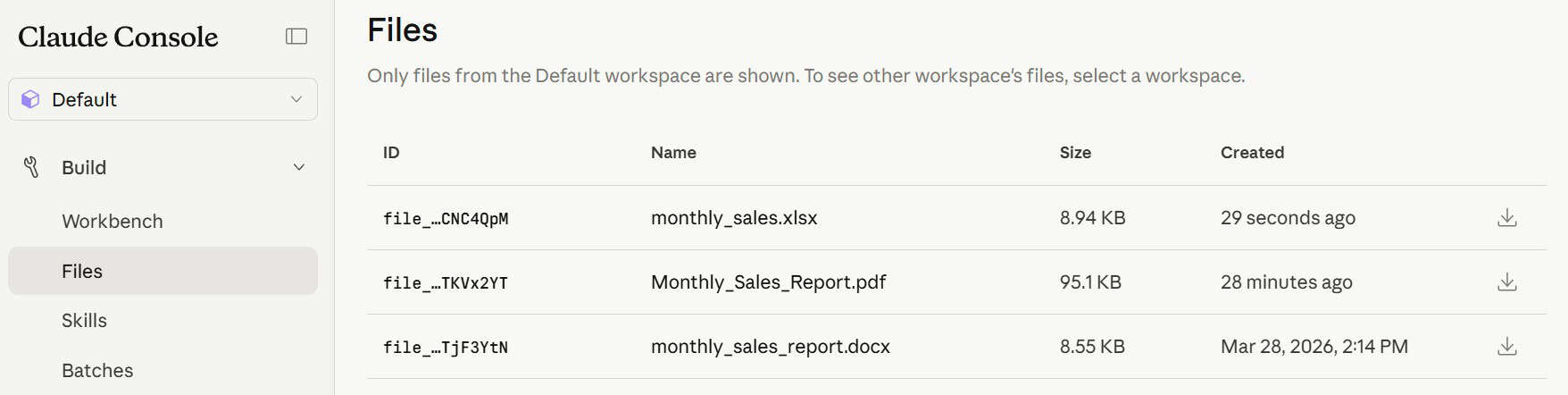
因此,我們使用 Spring AI 提供的AnthropicAPI ,根據檔案 ID 來取得檔案資訊。當然, AnthropicApi.FileMetadata包含有關文件的詳細資訊:
- 檔案名稱
- 文件大小
- 建立日期
- MIME 類型
AnthropicDocument是一個簡單的 Java 記錄,用於儲存檔案名稱、MIME 類型和檔案內容,並透過控制器將這些資訊傳回給客戶端:
public record AnthropicDocument(String fileName, String, mimeType, byte[] content) {

 }
至此,我們已經準備好進行測試的基本應用程式。
5. 測試運行
一切準備就緒,我們可以開始測試了。為此,讓我們使用 Postman 呼叫端點來觸發請求。
5.1. PDF報告
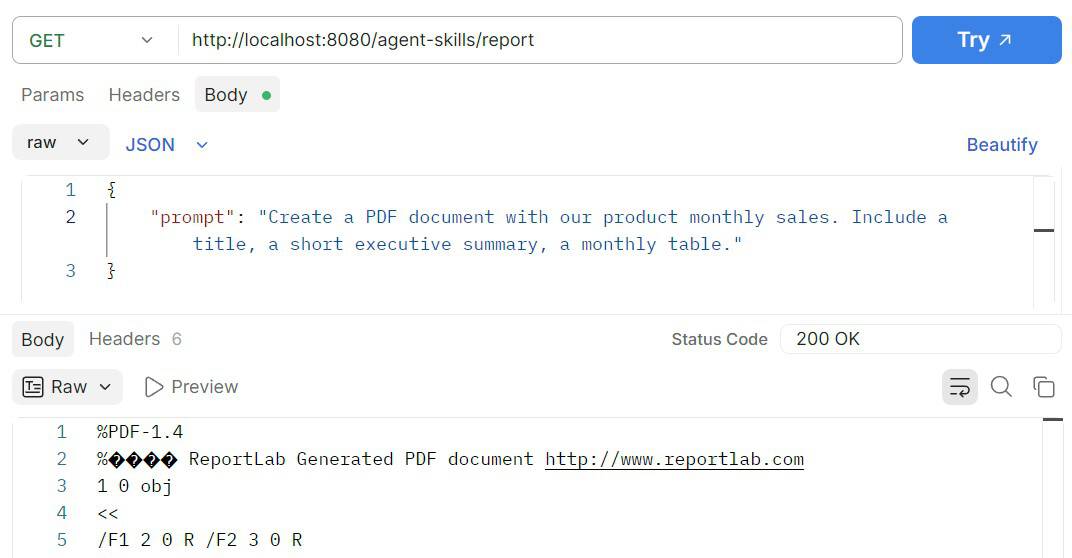
首先,我們建立一個範例請求,用於產生包含摘要和表格的 PDF 格式銷售報告:
此時,我們可以看到產生文件中的內容,包括每月銷售表格和摘要:
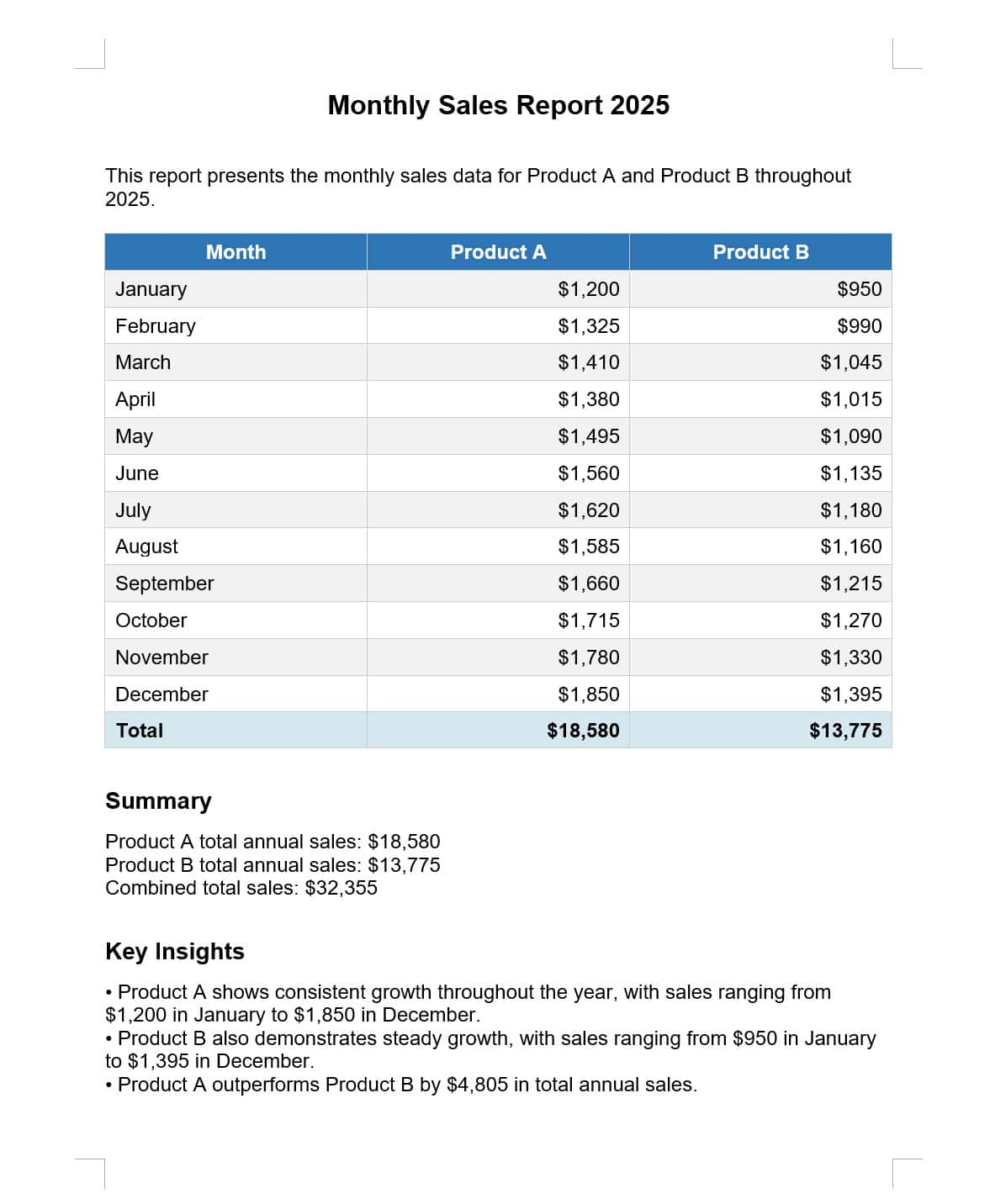
所以,所有資訊都已列出,並且採用結構化格式。
5.2. Excel電子表格
讓我們把提示改成產生一個 Excel 電子表格,並用長條圖取代摘要:
{

 "prompt": "Create a Excel spreadsheet for our product monthly sales. Include a monthly sales table, and a monthly bar chart next to the table."

 }
現在,報告格式已相應更改:
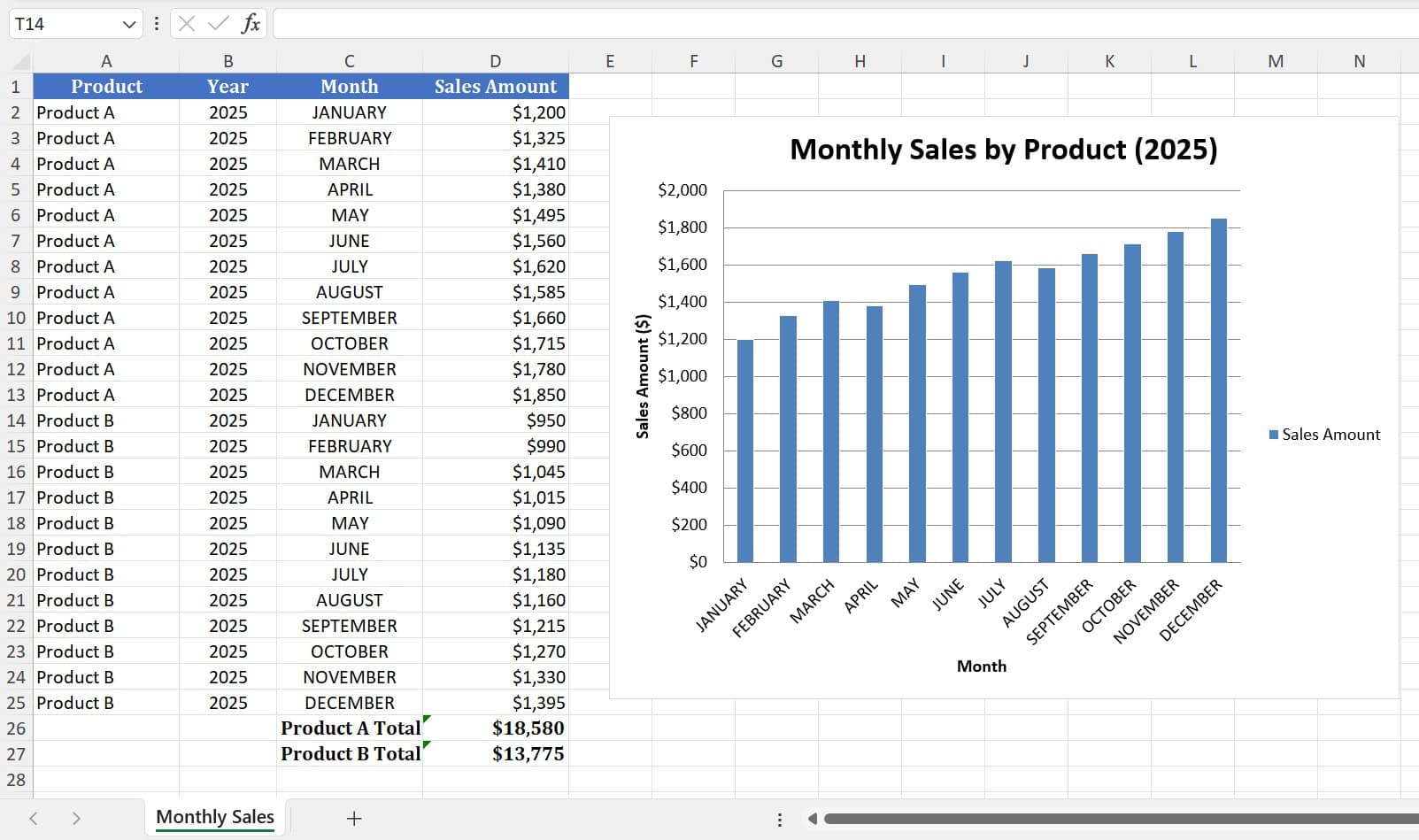
所以,我們看到了數據和格式都正確的電子表格。
6. 結論
在本文中,我們探討如何將 Anthropic 的預建代理技能與聊天模型集成,以使用 Spring AI 產生各種文件。
此外,我們也示範如何使用提示來控制實際輸出文件格式。尤其值得一提的是,這提供了在不更改應用程式邏輯的情況下產生不同文件格式的靈活性。
和往常一樣,完整的程式碼範例可以 在 GitHub 上找到。